Your own WireGuard VPN, run from a web console
WarpSpeed turns any Linux server into a WireGuard VPN for you or your team. Install it with one command, add users and devices from the browser, and connect with the official WireGuard apps.
curl -fsSL https://warpspeedvpn.net/install.sh | sudo bash
Run it as root on a fresh Debian, Ubuntu, or Rocky Linux server with a public IP address, x86_64 or ARM64. It installs WireGuard, sets up the firewall, and gets a TLS certificate for the console.
Runs on the cloud you already use
Any provider that gives you a Linux server and a public IP address, from a $5 instance to a dedicated machine
- Amazon Web Services
- Google Cloud
- Microsoft Azure
- DigitalOcean
- Vultr
- Akamai Linode
- Hetzner
- Oracle Cloud
Provider names and logos are trademarks of their owners. WarpSpeed is independent software and is not affiliated with or endorsed by them.
What people run it for
One server, one console, and the routes you choose decide what goes through the tunnel
Reach private servers
Add your VPC or office subnet as a route and devices reach databases, admin panels, and SSH on private addresses. Close those ports to the internet and keep only the WireGuard port open.
One public IP for your team
Route all traffic with 0.0.0.0/0 and every user leaves through the server's address. Put that one IP on the allowlists of your SaaS tools, cloud firewalls, and customer networks.
Choose your region
Run a server in each region you need and switch tunnels in the WireGuard app. Check localized sites, ads, and search results, or reach services from home while you are abroad.
Safe on any network
On hotel, airport, and cafe Wi-Fi a full tunnel encrypts everything between the device and your server. DNS protection sends every lookup to your resolver, whatever the network hands out.
Remote access for a team
Invite people by email or sign them in with your SAML identity provider. Each person manages their own devices, and removing a user drops their tunnels.
Your DNS, everywhere
Point devices at a resolver you run, such as Unbound, Pi-hole, or AdGuard Home, and keep filtering and private names working on every device, on every network.
The control panel
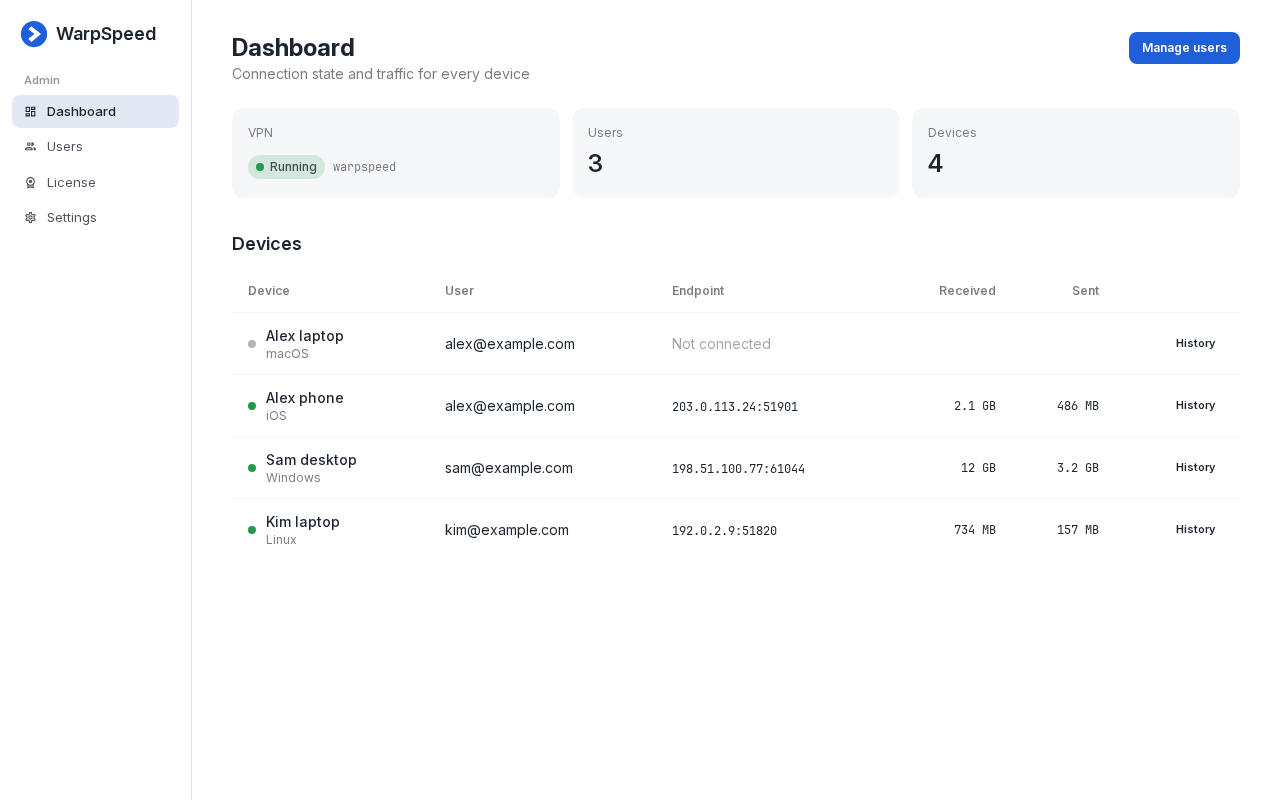
Every device, who owns it, where it is connected from, and how much it has moved
Built on WireGuard
The VPN protocol in the Linux kernel since 5.6, small enough to audit and fast enough to forget about
WireGuard replaces the negotiation and cipher menus of IPsec and OpenVPN with one fixed, modern construction. There is nothing to misconfigure: every tunnel uses the same primitives, keys are exchanged once, and sessions rekey on their own.
WarpSpeed runs the tunnel in the kernel and manages it in-process, so packets never pass through a userspace proxy. Your VPN traffic never touches WarpSpeed's infrastructure either. The server only calls us for its license, updates, and, if you choose, to relay invite email.
- Kernel speed
- Encryption runs in the Linux kernel across all cores, so throughput is usually limited by the server's network link, not the VPN.
- Instant roaming
- A one round trip handshake over UDP. Move from Wi-Fi to mobile data and the tunnel follows without reconnecting.
- Modern cryptography
- The Noise protocol framework with Curve25519, ChaCha20-Poly1305, BLAKE2s, and HKDF. No cipher negotiation and no downgrade.
- Forward secrecy
- Session keys rotate every two minutes, so a key captured later cannot decrypt traffic recorded earlier.
- Silent to scanners
- The port does not answer packets that are not from a known peer, so it does not show up as an open service in a scan.
- Small and verified
- About 4,000 lines of kernel code, with the protocol formally verified. Far less to trust than a VPN stack ten times its size.
How it works
From a fresh server to a connected phone in three steps
Install
Run the installer on a Linux server with a public IP address. It sets up WireGuard, the firewall, and a certificate, and can give the server a ready-made DNS name.
Configure and add devices
Sign in to the console, choose the address pool, routes, and DNS, then add a device and scan its QR code or download its configuration.
Connect
Turn the tunnel on in the WireGuard app for Windows, macOS, Linux, iOS, or Android. Traffic for your routes now goes through your server.
Everything a private VPN needs
The tunnel, the console, and the upkeep, on a server you own
One command install
A single script sets up WireGuard, the firewall, and a TLS certificate. The DigitalOcean 1-Click App skips even that.
Every device
Download a configuration or scan a QR code from the console. Works with the official WireGuard apps on every platform.
Full or split tunnel
Send all traffic through the server or only the networks you list. IPv4 and IPv6 pools, with NAT handled for you.
Client isolation
Choose whether devices on the VPN can reach each other. With client to client off, a lost laptop is not a path to everyone else's devices.
Traffic and history
See each device's owner, current endpoint, and bytes sent and received, with daily history charts.
Keeps itself current
Updates install in a maintenance window you choose, with a verified download and automatic rollback if the new version does not start.
Also on the marketplaces
Launch a ready-made WarpSpeed server from your cloud provider's catalog